
Search smallrig.com...


The Ultimate Guide to Using the 4596 All-in-One Universal Smartphone Video Kit with iPhone Series
SmallRig Support Team 2025-09-08 19:34:43
一、Pre-Setup: Must-Have Gear for Out-of-the-Box Use
✅ Essential Components
-
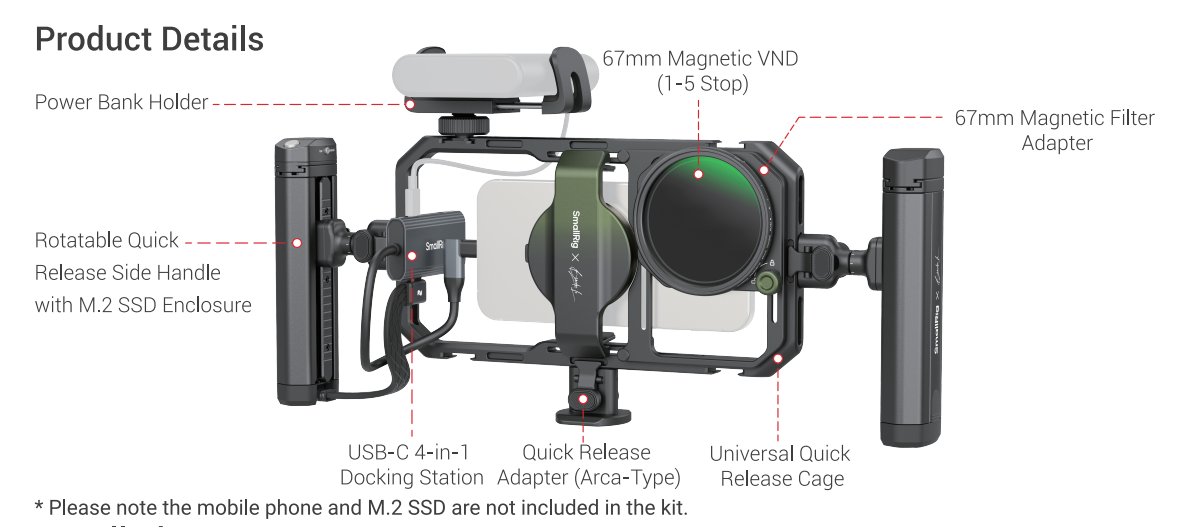
4596 Main Unit (with optional handle/docking hub)
-
iPhone 16 Pro Max/15 Pro Max or other compatible models (this guide focuses on iPhone)
-
Recommended SSD: Samsung 980/PM991a (NVMe V1.2 protocol) or SanDisk 2TB (requires external power)
-
Type-C cable + external power source (power bank recommended to avoid recording interruptions)
🛠️ Optional Upgrades (As Needed)
-
Arca-Swift Quick-Release Adapter (4609): Compatible with DJI RS3/Ronin gimbals (rebalancing may be required)
-
Third-party microphones: Cold shoe mount compatible (e.g., Shure MV88, may require USB-C/3.5mm adapter)
二、Setup & Compatibility: Turn Your iPhone into a Pro Camera
Note for iPhone 16 Pro Max Users
-
To use 67mm filters (e.g., star filters, ND filters), you’ll need to skip MagSafe and rely solely on the phone clamp. This may cause slight lens misalignment—manually adjust the filter angle to avoid vignetting.
Multi-Model Compatibility
-
iPhone 15 Series: Use the included phone clamp directly—no extra adjustments needed.
三、Core Features: Basic to Advanced Workflows
Remote Zoom Setup (iPhone 16/15 Pro Max)
-
Enable AssistiveTouch:
Go to Settings → Accessibility → Touch → AssistiveTouch → Mouse Keys → set "Max Speed" to level 7. -
Lock Portrait Orientation: Disable auto-rotate to prevent accidental touches.
-
Adjust Simulated Touchpoint: Quickly press the shutter button three times, then move the touchpoint to the center of the screen.
💡 *Pro Tip: Check out the official video tutorial (4596+Apple_Device_Tutorial_EN.mp4) for visual guidance.*
SSD Usage Tips
-
Protocol Limit: Only supports NVMe V1.2 (e.g., Samsung 980/PM991a). SATA SSDs are not compatible.
-
Power Solution: Always use external power via the docking hub to avoid recording failures due to low battery.
-
Format Requirement: Pre-format the SSD to exFAT on a computer.
Docking Hub Port Management
-
PD 100W Charging Port: For power supply only (prioritize connecting a power bank).
-
USB-C 3.1 Port: Best for SSDs (data transfer + power).
-
USB-C 2.0 Ports: Ideal for microphones or other USB-C accessories.
四、Advanced Techniques: Unlock Creative Potential
Filter Stacking & Anamorphic Lens Setup
-
Filter Stacking: Direct stacking (e.g., VND + Black Mist) is not supported. Use an adapter ring or combo filters (e.g., SKU 5001).
-
Anamorphic Lens Installation: Remove the filter adapter ring or mount the phone lens in reverse (ideal for ultra-wide creative shots).
五、Quick Troubleshooting
| Issue | Solution |
|---|---|
| Bluetooth remote won't connect | Clear phone's Bluetooth history → Ensure remote is in iOS mode → Restart and re-pair |
| ProRes video frame drops | Use the included cable → Connect external power → Close background apps |
| Phone clamp feels loose | Adjust the spring-loaded push-pull mechanism → If disassembly is needed, loosen the top and bottom screws |
六、Pitfall Avoidance Tips ⚠️
-
Thermal Limits: No official cooling accessories available. Keep ambient temperature below 30°C.
-
File Transfer: Connect the SSD directly to your computer via Type-C cable and drag/drop files.
-
Third-Party Mics: Only cold shoe-mounted mics are supported (verify USB-C/3.5mm adapter compatibility).
Conclusion: Why the 4596 Kit Is a Game-Changer
-
Universal Compatibility: Works seamlessly with iPhone 16/15 series and major Android flagships.
-
Modular Expandability: Mix and match filters, gimbals, and more.
-
Pro-Level Performance: Supports ProRes recording, high-speed data transfer, and native camera optimization.
Whether you’re a content creator or a professional filmmaker, the 4596 All-in-One Kit will take your mobile production to the next level! Ready to elevate your mobile filmmaking game? Give it a try today! 🎬
Keep Reading
 From Bare Phone to Pro Rig: The Complete Setup Guide for SmallRig × Brandon Li
 Mobile Cinema Rig Guide: Must-Have Accessories for Smartphone Video Creation
 71" Camera Tripod 3935: A Quick Guide to Mastering Versatile Shooting