
Search smallrig.com...


4402B Remote Control Indicator Light Not On - Troubleshooting Steps
SmallRig Support Team 2025-12-23 19:07:06
As shown in the figure below, please first check whether the battery insulation sheet at the position indicated by the arrow has been removed. After removing the insulation sheet, press and hold the remote control to test if it can work properly.
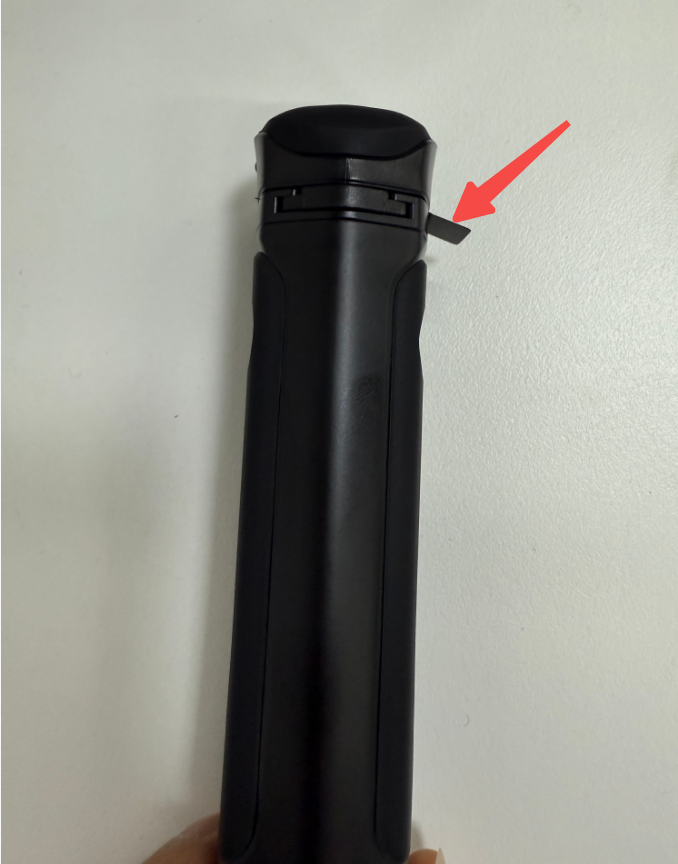
If the indicator light is still not on, use a Phillips screwdriver to open the remote control and check if there are batteries inside:
- If there are no batteries, please report the problem to the email address: smallrig@smallrig.com;
- If there are batteries, it is recommended to replace them (Specification: CR2032 225mAh) and try again. If it still doesn't work after replacing the batteries, please report the problem to the email address: smallrig@smallrig.com.
For the steps to remove the remote control battery, you can refer to the following video:
Keep Reading
 71" Camera Tripod 3935: A Quick Guide to Mastering Versatile Shooting
 A Complete Guide to Using the SmallRig 78" Camera Tripod 3474C
 How to Connect the Wireless Control Handle 4329 with the Follow Focus Motor 4297
Related Products from SmallRig