
Search smallrig.com...


Mastering Lens Focus with Smallrig 4296: A Step-by-Step Guide to Precision Control
SmallRig Support Team 2025-08-14 00:25:22
Product Overview
The focus controller is an essential tool for controlling lens focus in film production. During dynamic video shooting, it enables real-time adjustments to depth of field and focus shifts, adding narrative depth and visual (impact) to your footage. The Smallrig 4296B supports frequency band switching, travel calibration, A/B marking, and other functions, making it suitable for various professional filmmaking scenarios. It is a smart device that combines manual and motorized control.
Basic Operation Guide
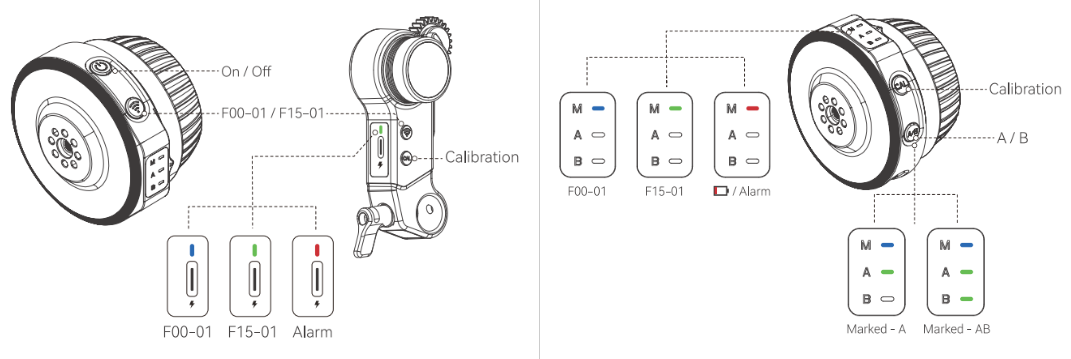
Frequency Band Setting
- Objective: Ensure synchronization between the handwheel and motor signals.
- Steps:
- Double-click the signal button on the handwheel or the up key on the motor to switch to the matching frequency band (e.g., 27MHz).
- Note: If the handwheel’s green light and the motor’s red light indicate different frequencies, switch them immediately to the same band.
Travel Calibration (Auto/Manual)
- Auto Calibration:
- Long-press the CAL button on the handwheel for over 2 seconds until the motor starts moving. The auto-calibration process begins automatically. Stop when the motor finishes calibrating.
- Manual Calibration:
- Long-press the CAL button until the motor starts turning, then click CAL once to enter manual mode. The A lamp blinks, indicating the motor has stopped.
- Manually rotate the lens to the farthest point of travel. Click CAL again; the A lamp stays on while the B lamp blinks.
- Rotate the lens back to the starting point and click CAL once more. Wait until both lamps turn off to complete calibration.
A/B Marking Function
- Purpose: Mark specific focus positions for quick recall.
- Steps:
- Rotate the handwheel to the starting point of your desired travel range and click the A/B button. The A lamp lights up, confirming the A mark is set.
- Move to the endpoint and click A/B again. The B lamp lights up, completing the A/B marks.
Common Issues & Troubleshooting
Issue 1: Motor Reverses Abnormally After Handwheel Stops
- Symptom: The motor continues reversing after the handwheel stops.
- Solution:
- Rotate the handwheel fully inward.
- Long-press the A/B button for over 5 seconds. Observe if the focus motor moves; once it does, release the button. No further action is needed; wait for the motor to reset.
Pro Tips
- Check Frequency Consistency First: Ensure handwheel and motor signals match before use.
- Regularly Calibrate Travel Range: Mechanical errors may accumulate over time; recalibrate weekly.
- Leverage A/B Marking Wisely: Mark key focus points (e.g., close-ups, scene transitions) to boost shooting efficiency.
Master these techniques to achieve flawless focus control! For complex issues, contact the SmallRig Support Team for assistance.
Keep Reading
 71" Camera Tripod 3935: A Quick Guide to Mastering Versatile Shooting
 A Complete Guide to Using the SmallRig 78" Camera Tripod 3474C
 How to Connect the Wireless Control Handle 4329 with the Follow Focus Motor 4297
Related Products from SmallRig